Feeding, sleep and diapers — one-handed, even at 3 a.m.
Agulka is a baby diary for the whole family. A big button instead of menus, a dark screen that won't wake anyone, a timer on the lock screen, a shared feed for mom, dad and grandma — and a baby monitor from a spare phone.
Reading on a computer?Point your Android phone's camera at the code — the file will download straight to the phone.
since 03:05
running · 7 min · you 00:40Sleep 2 h 31 min
00:40 – 03:11 · dad 00:31Diaper
wet · dad 23:58Bottle 120 ml
formula · grandma 19:20Solids: zucchini
first time · liked it
Made for nights when one hand is busy with the baby
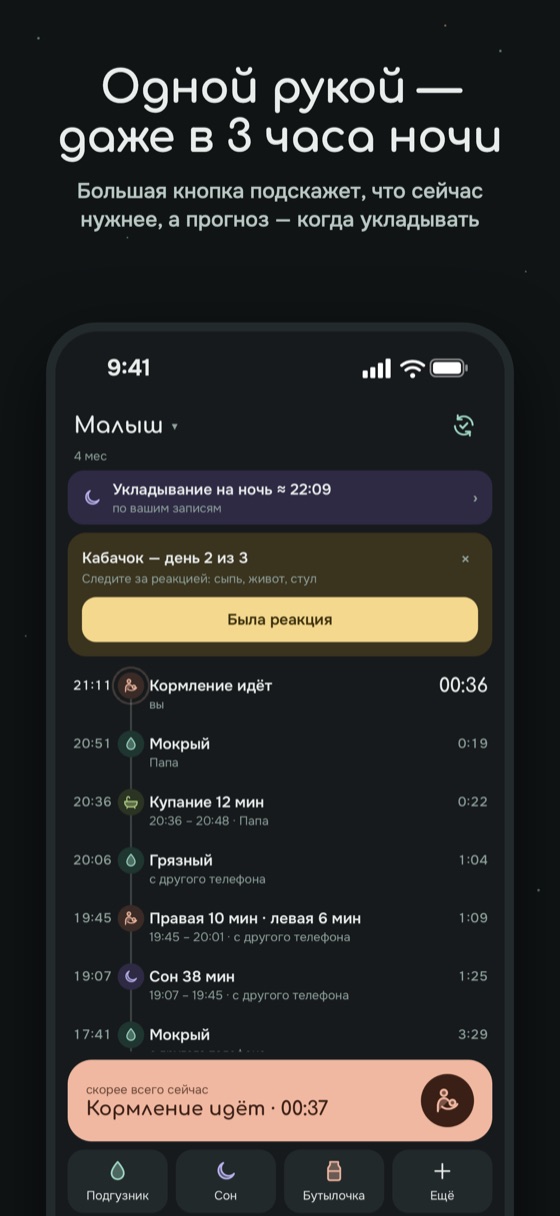
One big button
The app figures out what you need most right now: finish a feeding, put the baby down or wake them up. Everything else is in a sheet with tabs at the top — any entry is two taps away.
- Breastfeeding, bottle, pumping, sleep, diaper, solids, walk, bath, temperature, medicine, height and weight
- Dark theme by default — the screen won't blind you in the dark
- Forgot to tap? The time is easy to fix afterwards
Logging takes seconds
How much they drank is shown on a big number wheel: spin it with your finger, no aiming at tiny buttons. Agulka remembers the usual amount and offers it first.
- Large wheels for milliliters and grams; solids in grams, milliliters or spoons
- The “Most likely now” hint: breast, bottle, sleep or solids — whatever usually happens at this time
- Quick buttons on “Today” in your own order: drag the ones you need most to the top
- Breast timer with side choice — left or right, and switch on the go
- A quick check before saving: nothing gets logged by accident
- Forgot to log yesterday? Tap “Other day” and the entry lands in the right place
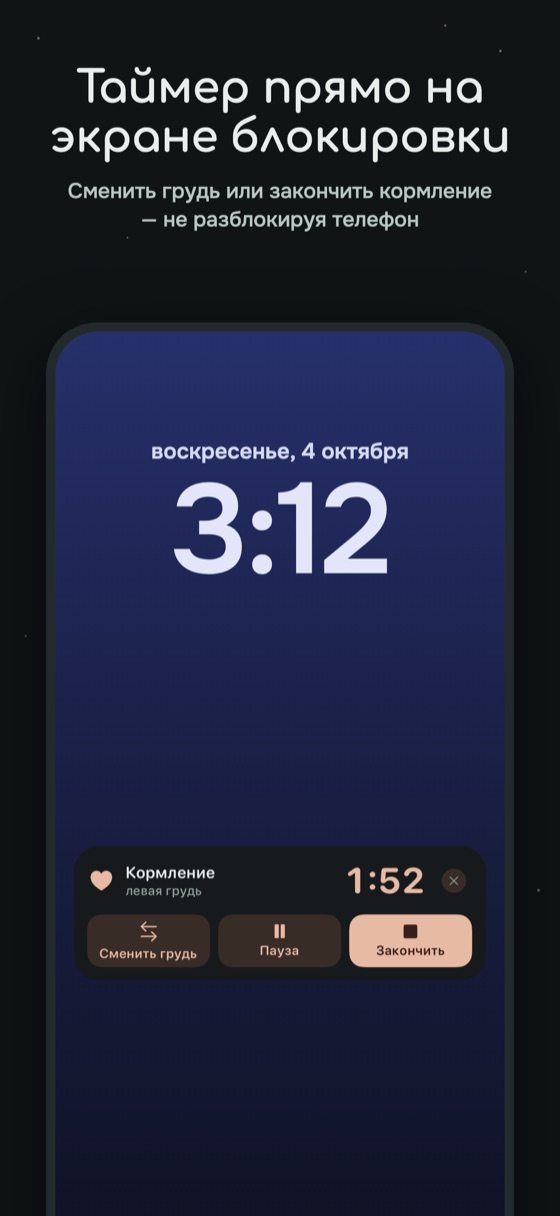
Timer on the lock screen
Feeding and sleep run right on the locked screen — switch sides or finish without unlocking the phone. Widgets show how long it's been since the last sleep and diaper.
- A separate card for each child — twins too
- If your partner started an entry, the timer shows up for you as well
since 23:50
since 00:20
Sleep forecast
Based on age and your entries, Agulka suggests when to expect the next nap and when to put the baby down for the night. It also reminds you when the wake window is coming to an end.
It's a guide, not a rule: every child is different.
New in PremiumA baby monitor from a spare phone
Leave an old phone by the crib and listen to your baby on your own phone — from the kitchen, the balcony or work. If the baby cries, you'll get a “Baby is crying” notification, even if Agulka is closed.
Dad wants to listen to the baby monitor
Crying alert
Agulka recognizes crying and sends “Baby is crying” to the adults in your family. You choose the sensitivity.
“Talk to baby”
Hold the button and your voice plays by the crib through the loudspeaker. Sometimes that's enough for the baby to fall back asleep.
Video on request
The camera turns on only when you want to look. “Night light” turns the screen by the crib into a soft night lamp.
No eavesdropping
Only the adults in your family can listen, and only with permission from whoever turned on the baby monitor. Sound is encrypted and never recorded anywhere.
iPhone and Android together
The baby's phone and yours can be any phones. Works over Wi‑Fi and mobile internet — via a secure server.
All night, no surprises
We'll show you how to set up the phone so it doesn't shut down the baby monitor. If the connection drops or the battery runs out, you'll get a notification.
The baby monitor is not a medical device and does not replace adult supervision.
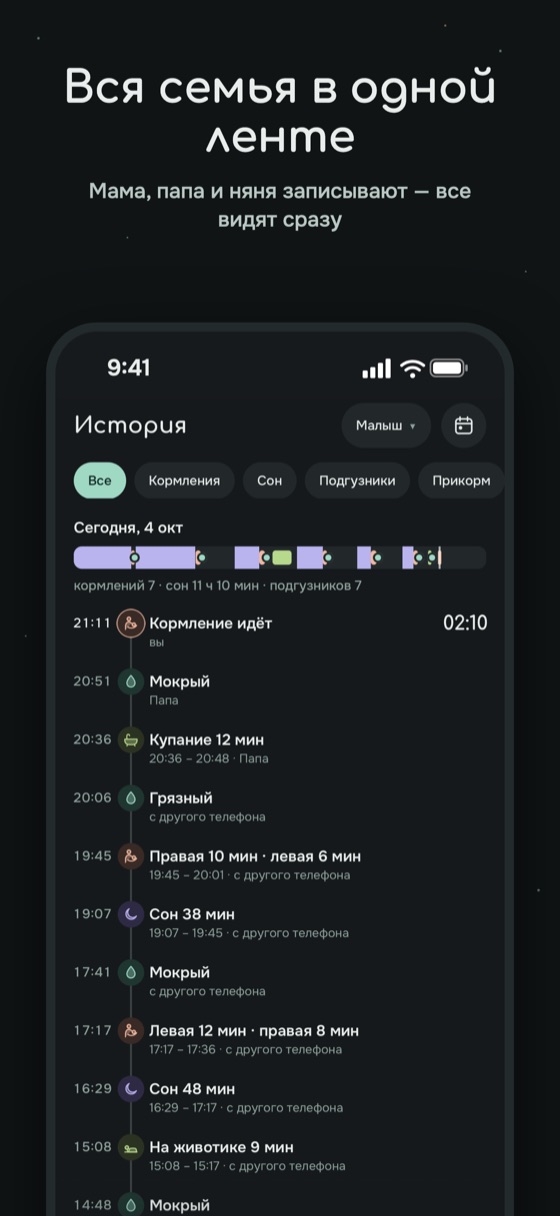
The whole family in one feed
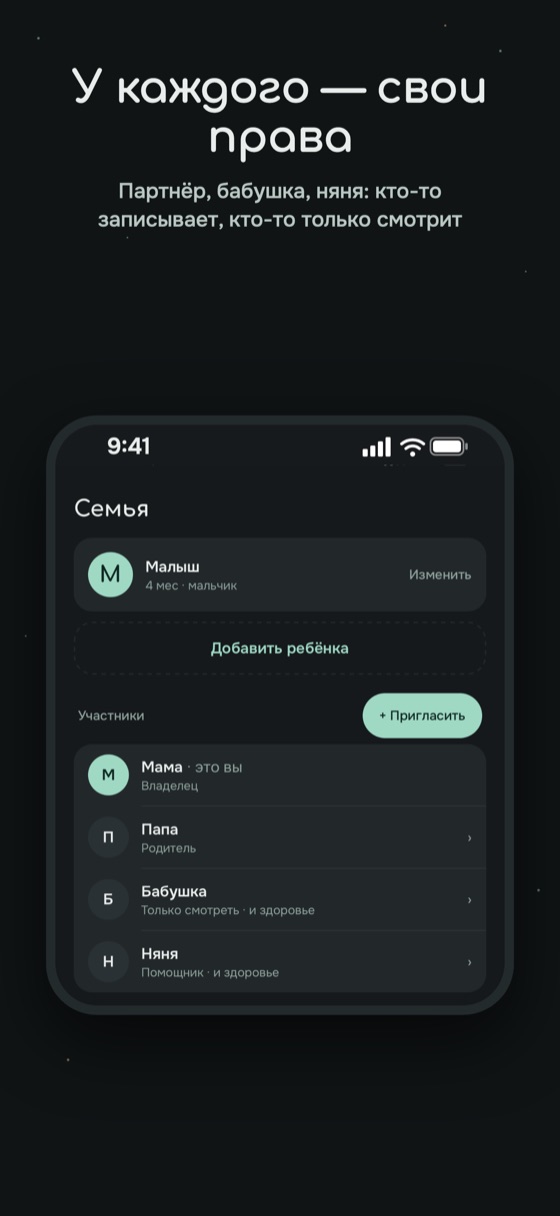
Invite your partner, grandma or a nanny with a code. Everyone sees entries right away, and everyone has their own permissions. Heading to work? Hand over your shift with one button: Agulka puts together a short summary of what happened.
- The nanny sees only the daily stuff, grandma can only view
- A notification when your partner starts or finishes a feeding
Last feeding at 07:15, right breast. Diaper changed at 07:40.
Tap on one phone — see it on all of them
Mom starts a feeding — and the same timer is already running on dad's lock screen. Grandma logs a walk — it's already in the shared feed. No more “did you feed her?” in the messenger.
running · 0:12 · you 00:40Sleep 2 h 31 min
dad
since 03:05
Even offline
Logged it on the subway or at the cottage? The entry is saved on the phone and goes to the family on its own as soon as there's internet.
Timers for everyone
A feeding or sleep started by your partner shows up on your lock screen automatically — you can see right away that the baby is eating or sleeping.
No mix-ups
Edited the same entry on two phones? The latest edit stays, no duplicates. Every entry shows who made it.
New phone — everything's there
The whole history is stored in the family cloud: sign in on a new phone and the feed is the same.
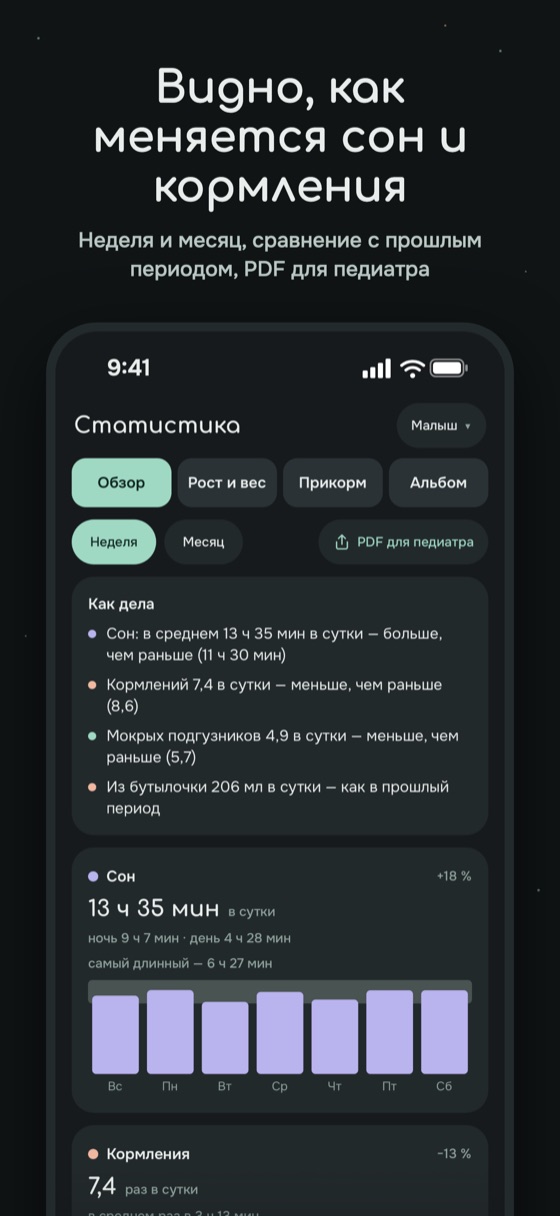
How much they ate today — at a glance
Milliliters by day
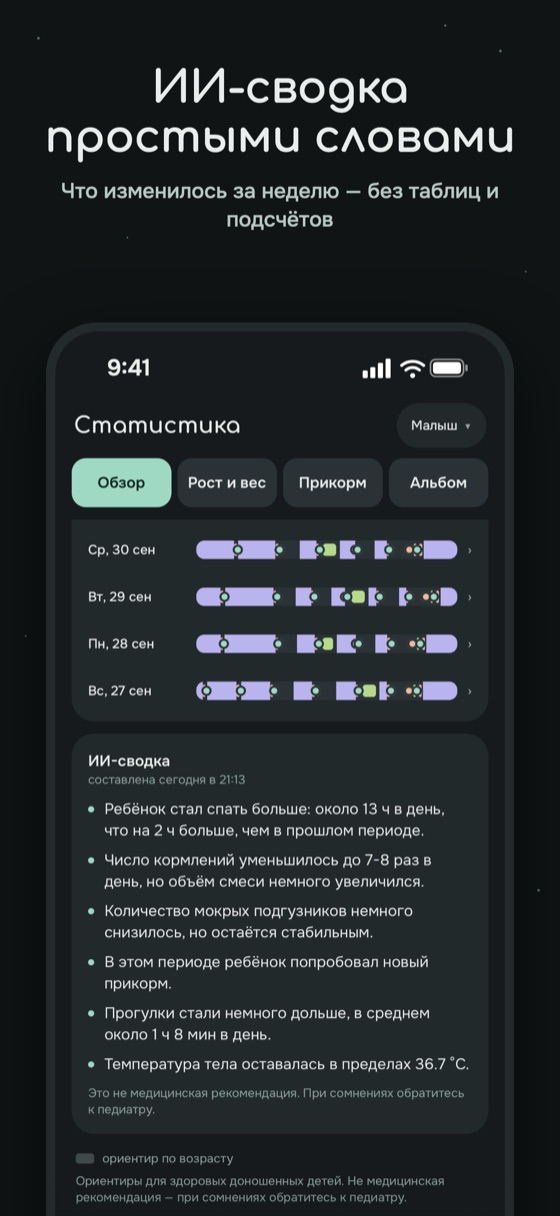
Bottle volume for each day, number of feeds and time at the breast. Totals for 7 or 30 days are compared with the previous period right away: more or less.
- Sleep per day, diapers, height and weight on WHO curves
- AI summary in plain words: what changed this week
Only anonymized numbers go into the summary — no names or photos.
▴ 6% vs previous 7 days
▾ 2 vs previous 7 days
This day next to the day before
In the history, each day has a short table: feeds, bottle, breast, solids, sleep and diapers — with the previous day's numbers next to them. You'll notice right away if the baby ate much less than usual today.
- Any “From – To” period with totals and a comparison to the same stretch before it
- PDF for the pediatrician for the dates you choose — show it to the doctor or send it in a messenger
| Tue, Oct 14 | This day | Prev. day |
|---|---|---|
| Feeds | 8 | 7 |
| Bottle | 720 ml | 680 ml |
| Breast | 1 h 05 min | 58 min |
| Solids, g | 45 | 30 |
| Sleep | 14 h 10 min | 13 h 40 min |
| Diapers | 7 | 8 |
And everything you'll need later
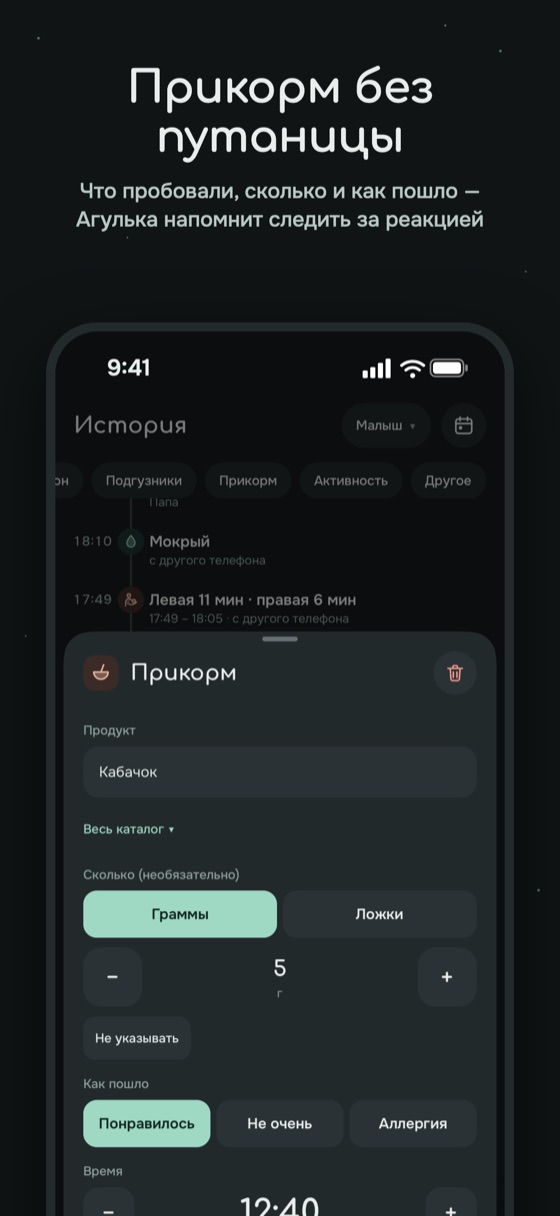
Solids
Which foods you've tried, what they liked, what caused a reaction.
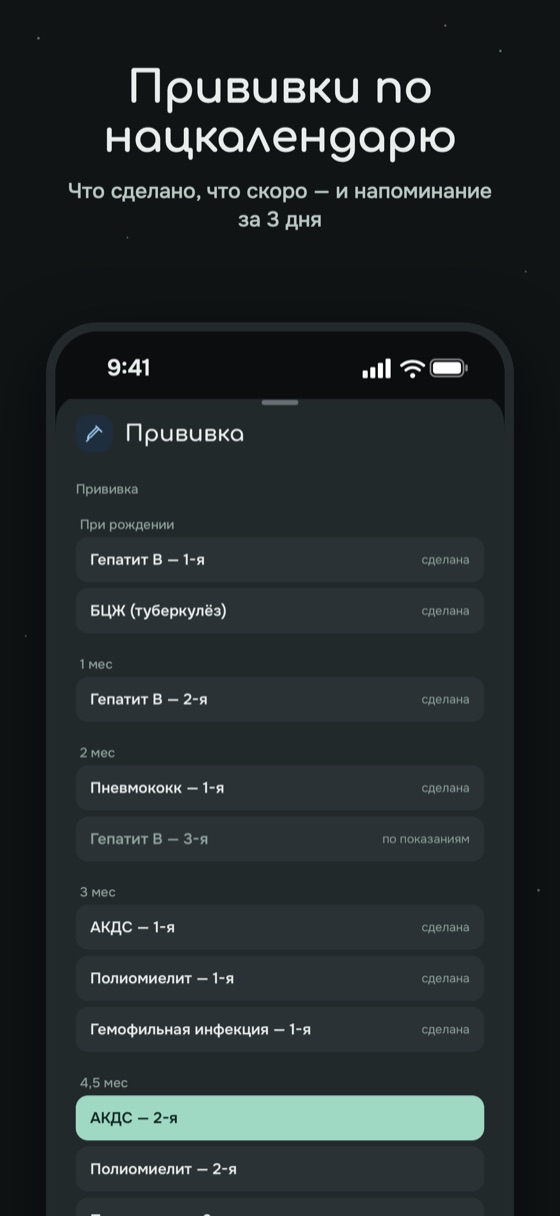
Vaccinations
The national schedule with reminders 3 days ahead — you won't miss a thing.
Height and weight
Measurements on WHO curves — see how your baby is growing compared with the norm.
PDF for the pediatrician
A report for any dates in one tap: sleep, feeds, volumes, stool, temperature, measurements — compared with the previous period.
PremiumPhotos with entries
First porridge, a rash for the doctor, a new tooth — photos are kept in private storage.
Offline
Entries are saved on the phone and sent to the family on their own when there's a connection.
Eight interface languages
Everyone in the family picks the language on their own phone: mom keeps the diary in Russian, while grandma reads the same feed in Uzbek or in Kazakh.
- Русский
- English
- Oʻzbekcha Latin
- Ўзбекча Cyrillic
- Тоҷикӣ
- Кыргызча
- Қазақша
- Беларуская
Agulka for Android
Install the app right from here, no store needed. It's the same Agulka with all the features and the shared family feed. Any phone with Android 7.0 or newer will do.
You opened this page on an iPhone. The iPhone version is coming soon to the App Store, and this file is for Android only: open agulka.ru/android on an Android phone.
Download for Androidversion 1.0.3 · 90 MBDownload the file
Tap “Download for Android”. If the browser asks whether to keep the file, confirm.
Allow installs from the browser
Open the downloaded file. If the phone asks for permission, turn it on: Settings → Security → “Install unknown apps” — and choose your browser. The menu items are named slightly differently on different phones.
Open and install
Tap “Install”, then “Open”. Join your family or create a new one.
Signed with our key
The file is signed with Agulka's key — the same one that will sign the store versions. Android won't install a fake on top of it.
Updates
New versions appear on this page: download and install over the old one — your entries stay in place. Later Agulka will be available in RuStore, and updates will come from there.
Android 7.0 and newer
Almost any phone released since 2016 will do. A family can mix Android and iPhone — the feed is shared.
Prices
Free
- All entries, timers, widgets and the lock screen
- Full history, sleep forecast, vaccinations
- 7-day statistics, up to 30 photos
- One adult and one child
Premium — for the whole family
- Partner, grandmas and nannies — as many adults as you like
- As many children as you like
- Baby monitor: sound, video, crying alert and “Talk to baby”
- All statistics for any period, AI summary and PDF for the pediatrician
- Unlimited photos and no ads
The first 7 days of Premium are free for every new family, no card required. One subscription covers all family members on any device. Monthly and yearly subscriptions renew automatically; you can cancel at any time. Pay by card, SBP or SberPay via YooKassa. Details in the offer agreement. (Document in Russian)
FAQ
Can I use it for free?
Yes. All entry types, timers, widgets, history, sleep forecast and vaccinations are free forever for one adult and one child. Premium is for keeping the diary together with your family, for several children, the baby monitor and detailed statistics.
How do I add my partner or grandma?
In the “Family” section, create an invitation and choose the permissions. The person installs Agulka and enters the code — the entries appear for them right away.
Where is the data stored?
On servers in Russia. Photos are kept in private storage that only your family can access. You can delete your account and all data right in the app.
I paid for Premium on the website — will it work on iPhone?
Yes. Premium is tied to the family, not the phone: pay once on the website or in the app, and it works for all members on any device.
What do I need for the baby monitor?
Two phones with Agulka and Premium in the family. One — an old one, for example — stays by the crib on the charger; with the other you listen to the baby. iPhone and Android in any combination, Wi‑Fi or mobile internet: sound uses about 20 MB per hour, video 150–250 MB per hour.
Can anyone eavesdrop on the baby monitor?
No. The microphone can only be turned on on the baby's phone itself — it can't be turned on remotely. Only the adults in your family can listen, and only with permission from whoever turned on the baby monitor: they'll see an “Allow / Decline” request on their screen, and for close ones they can tick “Always allow”. The “Listening” list is always on screen, and anyone can be disconnected. Sound is transmitted encrypted and never recorded anywhere.
What languages is Agulka available in?
Русский, English, Oʻzbekcha and Ўзбекча, Тоҷикӣ, Кыргызча, Қазақша and Беларуская. The language is chosen in the settings on each phone separately — the family's entries stay shared.
Does Agulka replace a doctor?
No. Agulka is a diary with hints to guide you. If something worries you, see a pediatrician — the PDF report will help you quickly show what's been happening.